Strukt AI vs INK TO BRICK: Bohemia Mía in both editors
A hands-on look at Bohemia Mía in Strukt AI and INK TO BRICK: layout, 2D and 3D views, editing controls, undo and an actual GLB export.
Strukt AI produced a recognizable shell of Bohemia Mía and gave us a downloadable GLB. INK TO BRICK’s current model provides a more developed view of the same apartment, particularly its glazed terraces, kitchen and furnishings. Opening both in their own editors makes the differences visible: the model, the correction tools and the work still needed before a handoff.
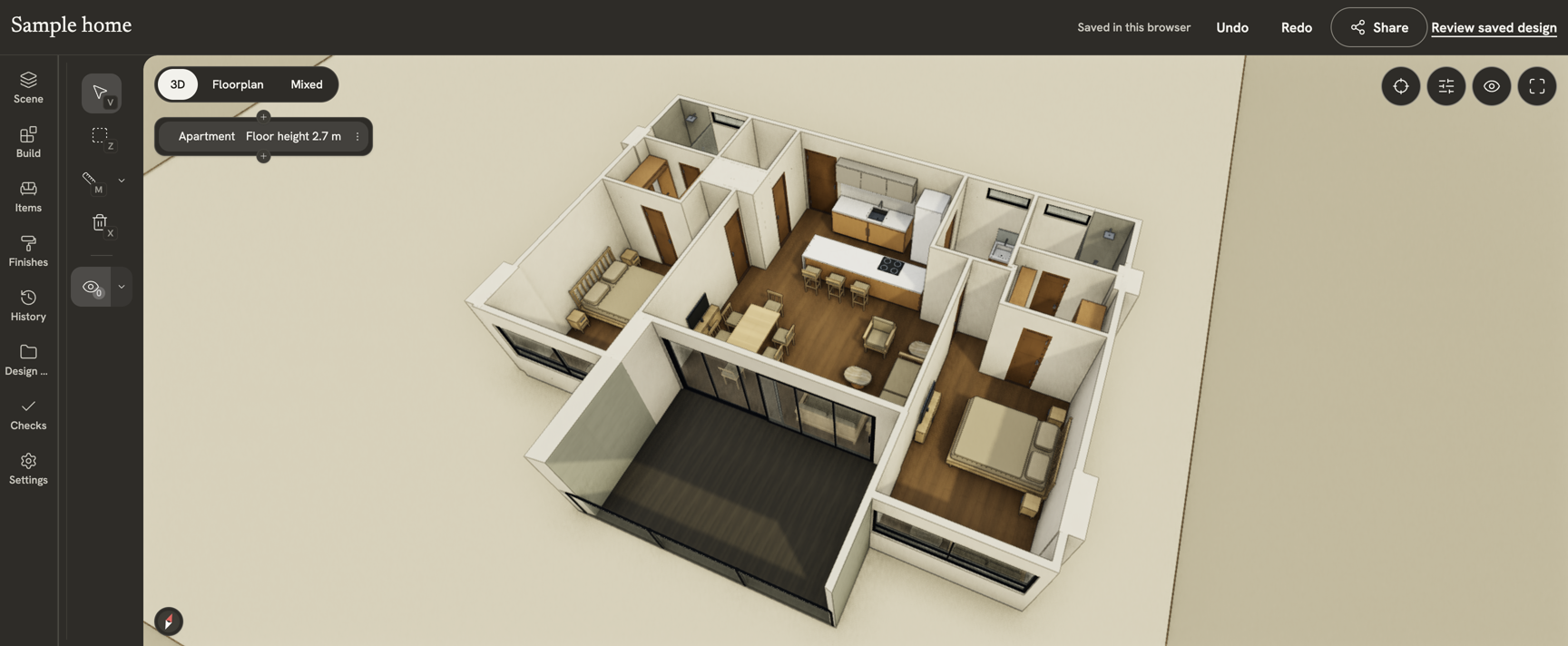
What the model shows
The Strukt result retains the apartment’s broad arrangement: bedrooms on either side, service spaces toward the back and a central living area. The drawing remains visible underneath, which is useful when checking wall placement. Several openings and terrace details still need attention. In the captured view, a solid wall separates the living area from the main terrace where the INK model shows a broad glazed opening.
INK’s model makes that indoor–outdoor connection easier to inspect. Glass railings, sliding glazing, cabinetry and furniture give the rooms a clearer purpose and make a design conversation more concrete. Furnishings help explain a space, but they do not prove that a wall or dimension is correct. The source and the model still need to be checked together.

Editor controls and navigation
Strukt puts recognition, drawing tools, rendering and exports close together. The persistent drawing underlay makes its first result easy to relate to the input. The tradeoff is a busy view: floor-plan modes, export buttons, dimension controls, render prompts and credit prompts all compete for space. INK gives more room to a task-specific panel and the model. Its furniture panel shows sizes before placement, while history and layout options have their own entries.
Scale and export: what we actually measured
Strukt’s displayed settings were 11.49 m for overall width, 2.50 m for height and 29 cm for wall thickness. Those are model settings, not checked building measurements. The downloaded GLB contained eight door-named nodes and two window-named nodes. These counts describe the artifact; they do not establish how many source openings were recovered correctly.
The Strukt AI guide explains calibration from a known wall length. We would establish that reference before using either model for dimension-sensitive decisions. A credible accuracy comparison needs the same source revision, matched measurement endpoints and separately counted wall and opening errors. File size and visual detail cannot substitute for those checks.
Where we would choose each editor
Strukt is a practical candidate when the next step is to correct a traced shell over its drawing and download a GLB. The successful export matters: this workflow delivers geometry you can take elsewhere. Its exposed calibration and wall tools deserve testing on your own plan, even where this initial result misses architectural detail.
We would choose INK for developing and presenting an apartment through furniture, finishes and layout alternatives in the same project. Bohemia Mía’s current terrace and interior treatment shows why that workflow matters. Native architectural editing depends on the underlying project: the public GLB used here is an imported object, so this local test does not demonstrate individual wall editing. See the INK editor walkthrough for the native project workflow and the model import guide for file-specific limits.
Review conditions and next comparisons
We inspected the saved Strukt project and the published Bohemia Mía project on October 7, 2026. The owner identified Strukt’s result as its first automatic output and chose the current published INK model, whose description includes later photo-based revisions. We opened INK’s intact public GLB in its local manual editor after component conversion exceeded the import output-size limit. The screenshots are editor captures; this is a workflow and model review, not a controlled first-pass accuracy score. Paid renders, AI correction, native-wall save/reload and mobile usability were not tested here.
For another result from this apartment, read the Kubikly editor review. The 43-tool guide covers additional reconstruction tools, layout generators, scanning products and APIs, with the evidence available for each.