INK TO BRICK vs HomeByMe: decoration, privacy and exports
HomeByMe fits shopping and decoration, with branded furniture and an optional paid redraw service. INK TO BRICK fits a private conceptual project that should leave as portable model files. Read-only protection and public visibility are separate settings in HomeByMe.[4][2][5]
Where each one fits
Choose INK TO BRICK if
Reconstruct a conceptual model from the source plan, keep furnishing and finish options editable, generate an image tied to its exact revision, publish explorable 3D and use a 20-format export library with access depending on the plan.[5]
Task by task
See the editing workflow
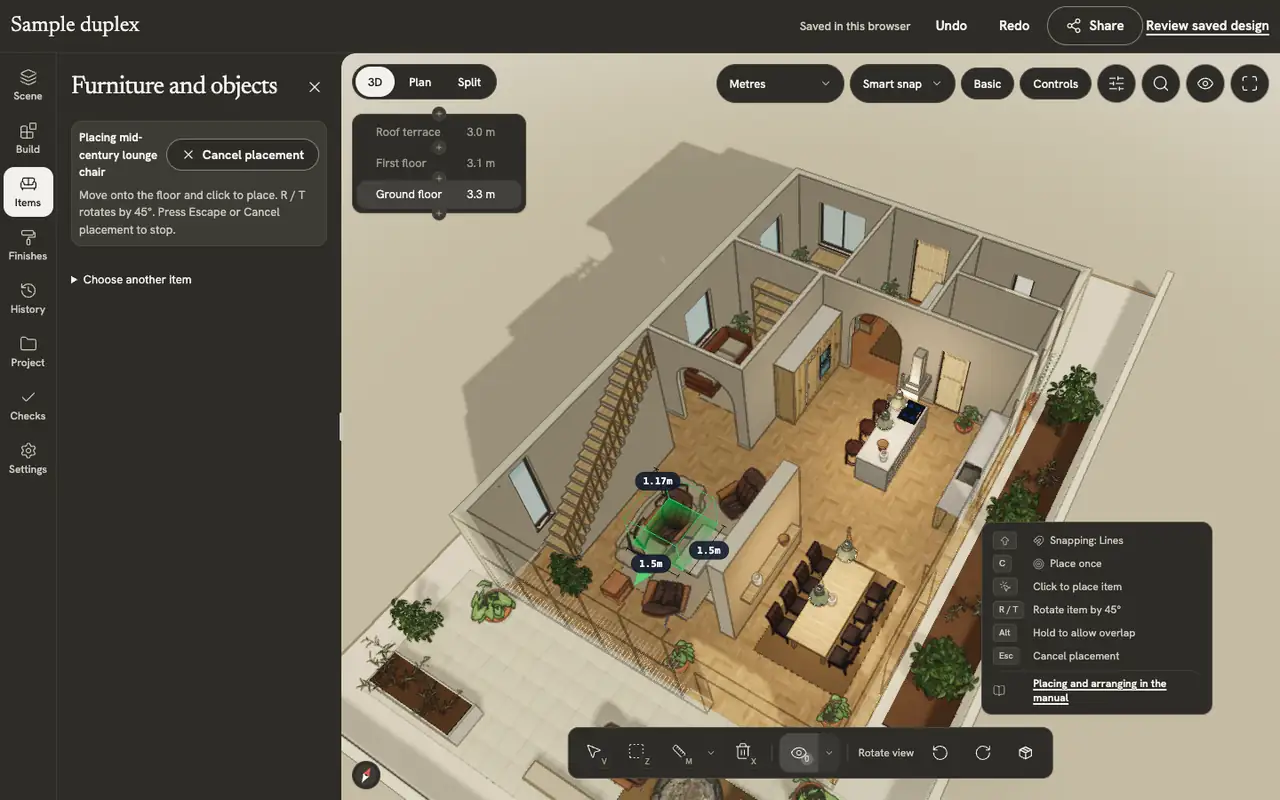
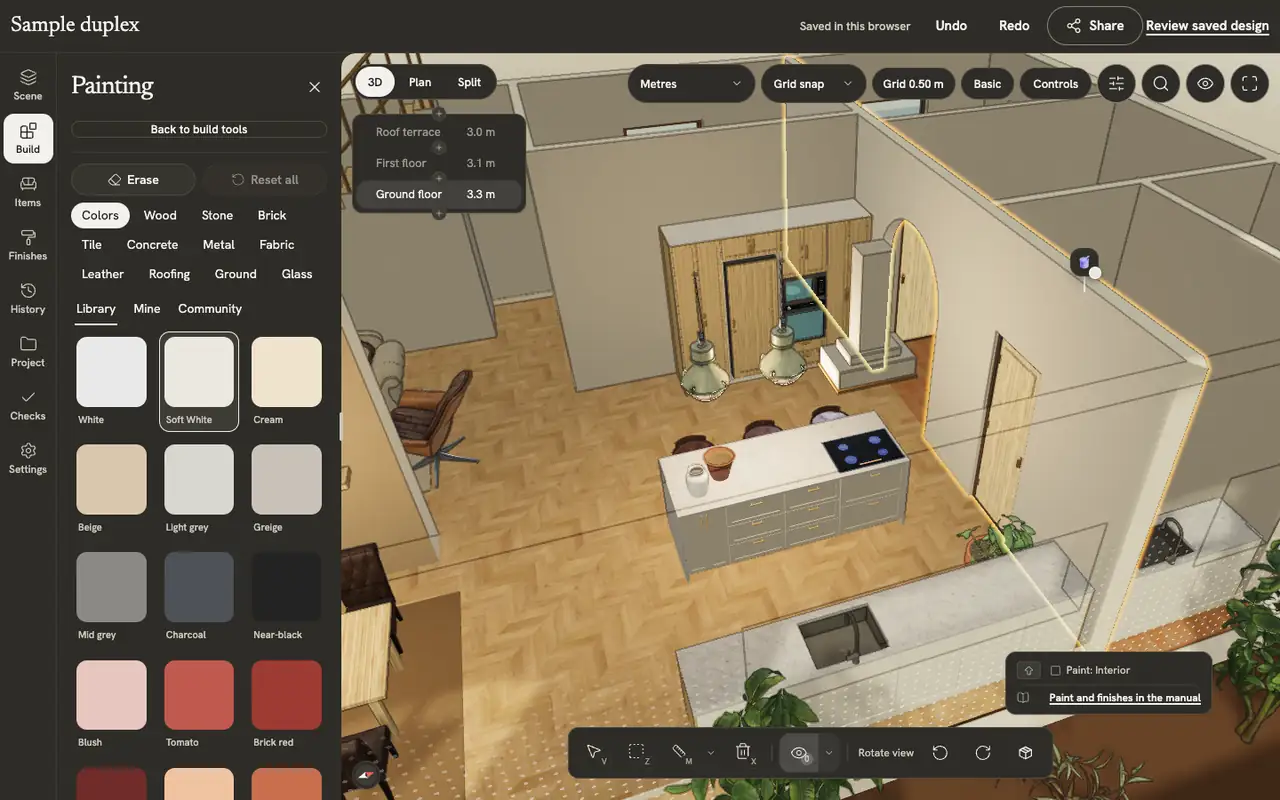
For an interior proposal, compare the furniture footprint and the surface you can actually change. The chair placement loop and material selection below show those two operations in the INK TO BRICK editor.
The demonstrations use native elements in the sample duplex authored in INK TO BRICK.
Placing and arranging
Place, turn, select, move, copy and delete pieces, and build kitchen runs and shelves along a wall.
Paint and finishes
Paint walls, floors and furniture from the material library, make your own materials, and apply catalog finishes to a room or the whole home.
Choose HomeByMe when shopping and decorating are the job
HomeByMe is a decoration platform first. It advertises more than 300 brands in its catalog, a shopping list with product prices and dimensions that links to the brand’s store, custom furniture with MakeByMe, Full HD and 4K images, video, and an Inspiration feed of other people’s rooms. For choosing a sofa, a paint color and a tile, that is the stronger environment.[4][2]
INK TO BRICK is aimed at the earlier question: what this drawing actually becomes in three dimensions, and what file leaves with it. Furnishing and finishes exist as saved options on top of a locked existing-conditions revision, so a shopping decision does not overwrite the reconstruction you are checking.[5]
Importing a plan and drawing over it is a different offer
HomeByMe documents importing a scanned PDF or JPG into a 3D project and offers a separate paid service where its experts draw the plan. Its drawing workflow also supports a plan used as an underlay. Confirm which route and amount of manual review applies to your source rather than inferring the workflow from the service alone.[1][2][4]
INK TO BRICK reconstructs rooms, walls and openings from the file you upload, then asks you to verify it against the same drawing. Neither route removes that check: compare a second known dimension, look for missed openings, and treat a plausible model as a starting point rather than a survey.[7]
Read-only is not the same as private
HomeByMe’s Pro read-only setting stops other users copying a project, while its plan table says those projects still appear in the Inspiration feed. Privacy for imported 3D assets is a separate paid feature. These documented settings do not establish the visibility of every possible project configuration; check the actual account before using a client plan.[4][3]
A purchased INK TO BRICK floor stays private until you publish it, and a published showcase page leaves the uploaded source drawing out. Check the actual setting in either product before you upload a client’s plan.[5][7]
Compare what you can finish, not the entry price
Starter provides two projects, five Full HD images and unlimited screenshots; deleting a Starter project does not return its credit. Essentials advertises unlimited projects with fifty Full HD, five 4K and five top-view images, while Pro adds professional features. Annual credits arrive at the start. No numerical paid price was reliably readable on October 6, 2026, so check the final checkout rather than an older quote.[4]
INK TO BRICK plans start at $6.99 a month for Home; Home Max is $19.99, Plural $39, Core $39, Pro $69 and Team $149 a month. Private manual planning and basic exports are included; photos and AI layouts use monthly credits. Compare the finished task and required exports.[7]
Review the evidence, then try your source
Check a wall or opening the rendering could hide, not just the final picture. The Isla de Pascua story combines original SketchUp and plan dimensions with MCP/AI refinement using photographs and video; it is a visual interpretation. The duplex is an authored sample demonstrating editor and presentation work, not proof of automatic reconstruction. Use these examples to choose the review you need to perform on your own drawing.[8][9]
Try your clearest one-floor plan. You see your home in 3D before you pay, and a plan is needed to edit it. A failed build goes back to your monthly builds. Check the required export and final checkout first. INK TO BRICK Pro and Team include MCP; INK TO BRICK Team includes API access. The account, editor and billing application currently use English.[7]
Sources and scope
The cited vendor pages support the capability comparison. Any direct demo observation is identified in the article; this is not a matched-source accuracy benchmark. Product details can change. Unavailable sources are identified, and older claims are not treated as current limitations. Check the linked plan, price and export details.
- HomeByMe: how it works
- HomeByMe: professional features and DraftSight export
- HomeByMe: import your own 3D models
- HomeByMe: plans, packs and services
- INK TO BRICK: publishing and downloads
- Explore published INK TO BRICK models
- INK TO BRICK: current access
- Isla de Pascua: visual interpretation
- Building the duplex: authored sample